
 資料結構
資料結構 網路
網路 RDBMS
RDBMS 作業系統
作業系統 Java
Java MS Excel
 iOS
iOS HTML
HTML CSS
CSS Android
 Python
 C 程式設計
 C++
C++ C#
C# MongoDB
 MySQL
MySQL Javascript
 PHP
PHP 物理學
物理學 化學
化學 生物學
生物學 數學
數學 英語
英語 經濟學
經濟學 心理學
心理學 社會學
社會學 時尚學
時尚學 法律學
法律學如何在導航選單中建立一個響應式登入表單?
以下是帶有登入表單的響應式導航選單的程式碼 −
例子
<!DOCTYPE html>
<html>
<head>
<meta charset="UTF-8" />
<meta name="viewport" content="width=device-width, initial-scale=1.0" />
<title>Document</title>
<style>
body {
   margin: 0px;
   margin-top: 10px;
   padding: 0px;
}
nav {
   width: 100%;
   background-color: rgb(39, 39, 39);
   overflow: auto;
   height: auto;
}
.links {
   display: inline-block;
   text-align: center;
   padding: 14px;
   color: rgb(178, 137, 253);
   text-decoration: none;
   font-size: 17px;
}
.links:hover {
   background-color: rgb(100, 100, 100);
}
form {
   float: right;
   margin-top: 8px;
}
form input{
   display: inline-block;
   padding: 6px;
   font-size: 17px;
   margin-right: 8px;
   border:none;
}
.selected {
   background-color: rgb(0, 18, 43);
}
@media screen and (max-width: 977px) {
.links {
   display: block;
}
form {
   display: block;
   color:white;
}
form input{
   margin-right: 0px;
   display: block;
   width: 100vw;
   margin: 0px;
   border-bottom: 2px solid rgb(178, 137, 253);
   text-align: center;
}
}
</style>
</head>
<body>
   <nav>
      <a class="links selected" href="#">
         Home
      </a>
      <a class="links" href="#">
         Login
      </a>
      <a class="links" href="#">
         Register
      </a>
      <a class="links" href="#">
         Contact Us
      </a>
      <a class="links" href="#">
         More Info
      </a>
      <form>
         <input type="text" placeholder="UserName..." />
         <input type="password" placeholder="Password...">
      </form>
   </nav>
</body>
</html>
輸出
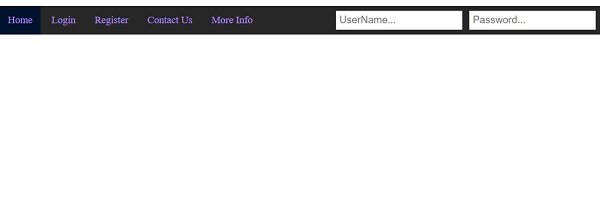
這會產生以下輸出 −
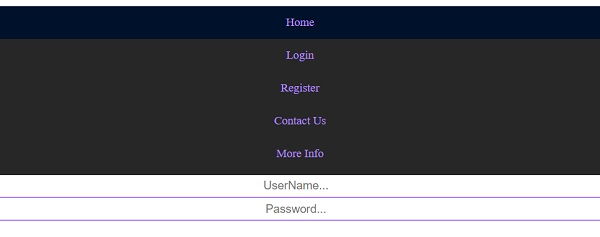
在調整螢幕大小時,nav 內部的內容將重新整理如下 −

更新於: 2020 年 4 月 3 日
1K+ 瀏覽

廣告