
 資料結構
資料結構 網路
網路 RDBMS
RDBMS 作業系統
作業系統 Java
Java MS Excel
 iOS
iOS HTML
HTML CSS
CSS 安卓
安卓 Python
 C 程式設計
 C++
C++ C#
C# MongoDB
 MySQL
MySQL Javascript
 PHP
PHP 物理學
物理學 化學
化學 生物學
生物學 數學
數學 英語
英語 經濟學
經濟學 心理學
心理學 社會學
社會學 時尚研究
時尚研究 法律研究
法律研究如何使用 Swift 在 iOS 應用程式中建立一個自定義對話方塊?
要在 Swift 中建立一個對話方塊,我們將使用 UIAlertController,它是 UIKit 中的一個重要部分。我們使用一個 iOS 應用程式和一個示例專案來完成此操作。
首先,我們將建立一個空專案,然後在其預設檢視控制器中,執行以下操作。
我們將建立一個 UIAlertController 物件。
let alert = UIAlertController.init(title: title, message: description, preferredStyle: .alert)
我們將建立一個操作
let okAction = UIAlertAction.init(title: "Ok", style: .default) { _ in
   print("You tapped ok")
   //custom action here.
}
我們將操作新增到警報並顯示它
alert.addAction(okAction)
self.present(alert, animated: true, completion: nil)
現在,我們將此內容轉換為函式 −
func createAlert(withTitle title:String,andDescription description: String) {
   let alert = UIAlertController.init(title: title, message: description, preferredStyle: .alert)
   let okAction = UIAlertAction.init(title: "Ok", style: .default) {
       _ in print("You tapped ok")
      //custom action here.
   }
   alert.addAction(okAction)
   self.present(alert, animated: true, completion: nil)
}
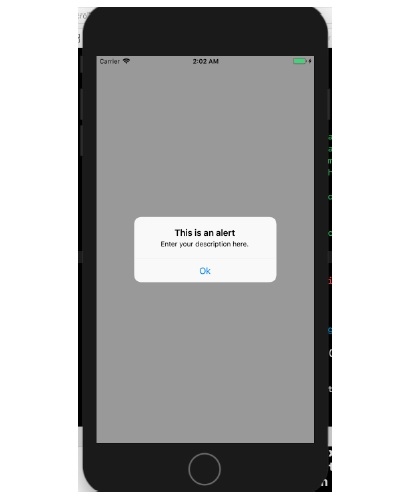
我們現在將在 viewWillLayoutSubviews 方法中呼叫此函式,當我們在裝置上執行此函式時,它的外觀如下。
override func viewWillLayoutSubviews() {
   self.createAlert(withTitle: "This is an alert", andDescription: "Enter your description here.")
}
結果如下所示。

更新時間: 2020 年 6 月 30 日
737 次瀏覽

廣告