
 資料結構
資料結構 網路
網路 關係資料庫管理系統 (RDBMS)
 作業系統
作業系統 Java
Java MS Excel
 iOS
iOS HTML
HTML CSS
CSS Android
 Python
 C 語言程式設計
 C++
C++ C#
C# MongoDB
 MySQL
MySQL Javascript
 PHP
PHP 物理學
物理學 化學
化學 生物學
生物學 數學
數學 英語
英語 經濟學
經濟學 心理學
心理學 社會學
社會學 服裝設計
服裝設計 法學
法學如何在 Laravel 中檢查資料庫連線?
Laravel 資料庫配置儲存在 config/database.php 檔案中。此檔案中列出了資料庫配置列表。預設情況下,您需要告訴 Laravel 您將要使用的資料庫。
預設使用的資料庫是 mysql,我們將堅持使用它並檢查與 mysql 的資料庫連線。
/*
|--------------------------------------------------------------------------
| Default Database Connection Name
|--------------------------------------------------------------------------
| Here you may specify which of the database connections below you wish
| to use as your default connection for all database work. Of course
| you may use many connections at once using the Database library.
|
*/
'default' => env('DB_CONNECTION', 'mysql'),
`.env` 檔案包含資料庫的環境配置,如下所示:
DB_CONNECTION=mysql
DB_HOST=127.0.0.1
DB_PORT=3306
DB_DATABASE=test
DB_USERNAME=root
DB_PASSWORD=
當您開始使用資料庫時,請確保在 `.env` 檔案中輸入所有有效的資料庫連線到 mysql 的詳細資訊。讓我們嘗試一個簡單的示例來演示資料庫連線。
示例 1
<?php
namespace App\Http\Controllers;
use Illuminate\Http\Request;
use Illuminate\Support\Facades\DB;

class StudentController extends Controller{
   public function index() {
      try {
         $dbconnect = DB::connection()->getPDO();
         $dbname = DB::connection()->getDatabaseName();
         echo "Connected successfully to the database. Database name is :".$dbname;
      } catch(Exception $e) {
         echo "Error in connecting to the database";
      }
   }
}
輸出
以上程式碼的輸出為:
Connected successfully to the database. Database name is :test
示例 2
另一種方法是在啟動 Laravel 時測試資料庫連線。您可以將資料庫連線程式碼新增到 app/Providers/AppServiceProvider 中的 `boot()` 方法中,如下所示:
/**
* Bootstrap any application services.
*
* @return void
*/

public function boot(){
   try {
      DB::connection()->getPDO();
      dump('Database is connected. Database Name is : ' . DB::connection()->getDatabaseName());
   } catch (Exception $e) {
      dump('Database connection failed');
   }
}
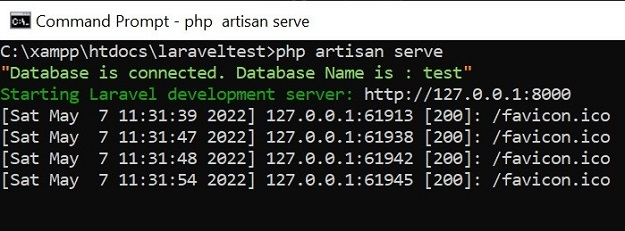
現在,當您執行 `php artisan serve` 時,您應該會看到資料庫連線成功或失敗的訊息,如下面的螢幕截圖所示:
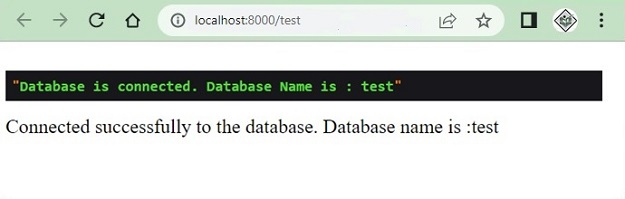
但是,上述方法的缺點是您也會在檢視中看到它,例如:
示例 3
另一種解決方法是我們可以建立一個自定義命令,並在其中新增資料庫檢查程式碼,並在需要時使用它。要建立自定義命令,請使用以下命令:
php artisan make:command testdbconnection
輸出
以上程式碼的輸出為:
C:\xampp\htdocs\laraveltest>php artisan make:command testdbconnection
Console command created successfully.

C:\xampp\htdocs\laraveltest>
testdbconnection 檔案將位於 app/console/commands 目錄中。
testdbconnection.php
<?php
namespace App\Console\Commands;
use Illuminate\Console\Command;
use DB;

class testdbconnection extends Command{
   /**
   * The name and signature of the console command.
   * @var string
   */
   protected $signature = 'testdbconnection';

   /**
   * The console command description.
   * @var string
   */
   protected $description = 'Testing DB connection';

   /**
   * Create a new command instance.
   *
   * @return void
   */
   public function __construct() {
      parent::__construct();
   }

   /**
   * Execute the console command.
   *
   * @return int
   */ public function handle() {
      try {
         DB::connection()->getPDO();
         dump('Database is connected. Database Name is : ' . DB::connection()->getDatabaseName());
      } catch (Exception $e) {
         dump('Database connection failed');
      }
   }
}
更改命令名稱、描述,並將資料庫連線程式碼新增到 `handle()` 方法中,如上所示。現在開啟 `kernel.php` 檔案,並在其中新增以下行:
protected $commands = [
   Commands\testdbconnection::class
];
現在您可以測試您的命令,如下所示:
C:\xampp\htdocs\laraveltest>php artisan testdbconnection
"Database is connected. Database Name is : test"

C:\xampp\htdocs\laraveltest>

更新於:2022年8月30日
22K+ 次瀏覽

廣告