
 資料結構
資料結構 網路
網路 關係資料庫管理系統 (RDBMS)
 作業系統
作業系統 Java
Java MS Excel
 iOS
iOS HTML
HTML CSS
CSS Android
 Python
 C 語言程式設計
 C++
C++ C#
C# MongoDB
 MySQL
MySQL Javascript
 PHP
PHP 物理學
物理學 化學
化學 生物學
生物學 數學
數學 英語
英語 經濟學
經濟學 心理學
心理學 社會學
社會學 服裝設計
服裝設計 法學
法學如何使用 JavaScript 檢查是否存在具有特定 ID 的元素?
概述
可以使用 JavaScript 檢查 HTML 元素中是否存在特定 ID 以完成特定任務。要解決這個問題,我們應該瞭解如何訪問 HTML 文件物件模型 (DOM)。因此,使用 ID 名稱指定的 HTML 元素可以透過 document 物件訪問,該物件包含多種方法,我們將使用其中 `getElementById()` 方法。
語法
使用的基本語法為:
document.getElementById()
document − 在給定的語法中,document 是網頁在瀏覽器中載入時載入的物件。它是一個樹狀結構,從上到下構建。
getElementById() − `getElementById()` 是 document 物件的一種方法。此方法有助於訪問包含特定給定 ID 的 HTML 元素。ID 作為引數傳遞給該方法。
解釋
在給定的程式碼中,"id" 由 `document.getElementById()` 方法訪問,其中傳遞了 HTML 元素的 id。HTML 元素儲存在變數 "id" 中,然後我們使用 if-else 條件進行檢查。如果變數為真,即如果它包含特定的 id,則條件終止,否則,else 條件終止。
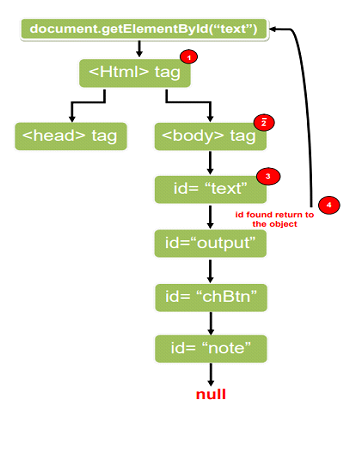
使用 `document.getElementById()` 時,它的工作原理類似於樹,搜尋樹的每個節點以查詢包含給定特定 id 的節點。在給定的圖中,它將跟蹤所有從 1🡪2🡪3 的路徑。當搜尋節點 3 時,如果在該節點上可以找到給定的特定 id,其中包含 id=“text”,它將返回並將其儲存在變數中。
演算法
步驟 1 - 建立一些 HTML 標籤,例如 label、p 等和一個 HTML 按鈕。
步驟 2 - 使用 DOM 方法 `document.getElementById()` 訪問 HTML 中的任何元素。將其儲存在變數中。
步驟 3 - 使用 `addEvenListener()` 和 `click()` 事件方法。
步驟 4 - 將 HTML 元素的變數作為條件傳遞給 if-else。
步驟 5 - 如果 id 等於 null,則它返回不存在特定 id 元素,否則它將返回 id。
示例
<!DOCTYPE html>
<html lang="en">
<head>
   <title>Check element with specific id exist or not</title>
   <style>
      body {
         color: white;
         background-color: #0a0a0a;
         display: flex;
         place-content: center;
         min-height: 90vh;
         flex-direction: column;
         text-align: center;
      }
      p {
         width: 50%;
         margin: 8px auto;
         padding: 0.4rem;
      }
      button {
         border: none;
         padding: 0.4rem;
         background-color: #0a0a0a;
         box-shadow: 0px 0px 5px rgba(255, 255, 255, 0.788);
         border-radius: 5px;
         margin: 0 auto;
         color: white;
      }
   </style>
</head>
   <body>
      // The HTML body contains 4 id text, output, chBtn, note
      <label id="text"></label>
      <p id="output"></p>
      <button id="chBtn">Check Now</button>
      <p id="note"></p>
      <script>
         document.getElementById("chBtn").addEventListener("click", () => {
            var id = document.getElementById("text"); //access the HTML element id

            // checks whether the id is present in the HTML element or not.
            if (id != null) {
               document.getElementById("output").innerText = "Id exist " + id
               document.getElementById("output").style.background = "green"
               document.getElementById("note").innerText = "*" + id + " is type HTML element"
            } else {
               document.getElementById("output").innerText = "Id does not exist"
               document.getElementById("output").style.background = "tomato"
            }
         })
      </script>
   </body>
</html>
輸出
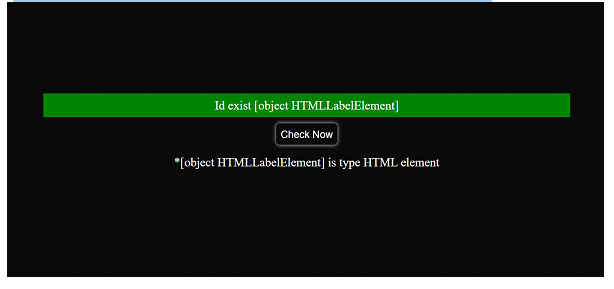
當 id=“text” 存在於 HTML 元素中時
在給定的輸出中,[HTMLLabelElement] 表示我們已處理檢查的“id”在“HTML 的標籤元素”中可用。
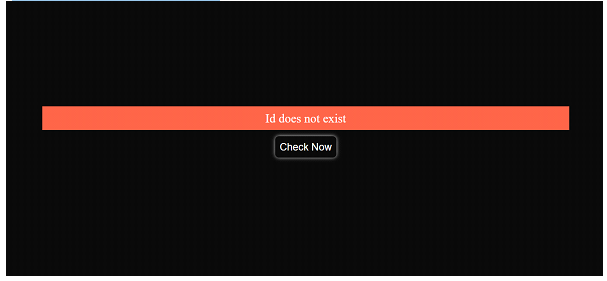
當 id=“tex” 不存在於任何 HTML 元素中時
<label id="text"></label>
結論
`document.getElementById()` 的返回型別為“Object HTMLTagElement”,如果在 DOM 搜尋樹中找不到 id,則返回 null。“id” 的每個 HTML 元素都是唯一的,因此很容易在 HTML 標籤中搜索特定的 id。如果“id”不是唯一的,則 `getElementById()` 方法將返回在 HTML 主體中找到的第一個元素。`document.getElementById()` 與 `addEventListener` 連線,我們可以直接從 JavaScript 執行點選事件,而無需在 `

4K+ 瀏覽量
