
 資料結構
資料結構 網路化
網路化 RDBMS
RDBMS 作業系統
作業系統 Java
Java MS Excel
 iOS
iOS HTML
HTML CSS
CSS Android
 Python
 C 程式設計
 C++
C++ C#
C# MongoDB
 MySQL
MySQL Javascript
 PHP
PHP 物理
物理 化學
化學 生物學
生物學 數學
數學 英語
英語 經濟學
經濟學 心理學
心理學 社會學
社會學 時尚學
時尚學 法律學
法律學如何在 Java 中更改 JTable 的表頭字型
要更改表頭字型,你需要先獲取表頭 -
JTableHeader tableHeader = table.getTableHeader();
現在,使用 Font 類設定新的字型。這裡,我們已將字型設定為 Verdana,樣式設定為 PLAIN,字型大小設定為 14 -
Font headerFont = new Font("Verdana", Font.PLAIN, 14);現在,將此字型設定到表頭 -
tableHeader.setFont(headerFont);
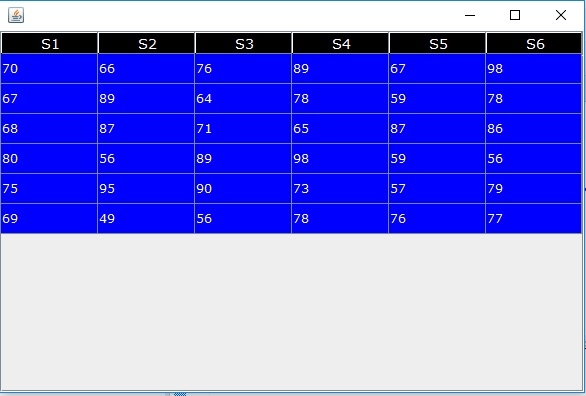
下面是更改表頭字型的示例 -
示例
package my;
import java.awt.Color;
import java.awt.Font;
import javax.swing.JFrame;
import javax.swing.JScrollPane;
import javax.swing.JTable;
import javax.swing.table.JTableHeader;
public class SwingDemo {
   public static void main(String[] argv) throws Exception {
      Integer[][] marks = {
         { 70, 66, 76, 89, 67, 98 },
         { 67, 89, 64, 78, 59, 78 },
         { 68, 87, 71, 65, 87, 86 },
         { 80, 56, 89, 98, 59, 56 },
         { 75, 95, 90, 73, 57, 79 },
         { 69, 49, 56, 78, 76, 77 }
      };
      String col[] = { "S1", "S2", "S3", "S4", "S5", "S6"};
      JTable table = new JTable(marks, col);
      Font font = new Font("Verdana", Font.PLAIN, 12);
      table.setFont(font);
      table.setRowHeight(30);
      table.setBackground(Color.blue);
      table.setForeground(Color.white);
      JTableHeader tableHeader = table.getTableHeader();
      tableHeader.setBackground(Color.black);
      tableHeader.setForeground(Color.white);
      Font headerFont = new Font("Verdana", Font.PLAIN, 14);
      tableHeader.setFont(headerFont);
      JFrame frame = new JFrame();
      frame.setSize(600, 400);
      frame.add(new JScrollPane(table));
      frame.setVisible(true);
   }
}
輸出

更新於: 2019 年 7 月 30 日
2 千次以上瀏覽

廣告