
 資料結構
資料結構 網路
網路 關係資料庫管理系統 (RDBMS)
 作業系統
作業系統 Java
Java MS Excel
 iOS
iOS HTML
HTML CSS
CSS Android
 Python
 C語言程式設計
 C++
C++ C#
C# MongoDB
 MySQL
MySQL Javascript
 PHP
PHP 物理學
物理學 化學
化學 生物學
生物學 數學
數學 英語
英語 經濟學
經濟學 心理學
心理學 社會學
社會學 服裝設計
服裝設計 法律研究
法律研究如何在JavaScript中更改元素的CSS樣式?
JavaScript 可以使用一些方法(例如 getElementById()、getElementByClassName() 等)來更改元素的CSS 樣式,例如顏色、字型大小等。
在下面的示例中,使用 getElementById() 方法更改了元素的字型樣式和字型大小。
示例-1
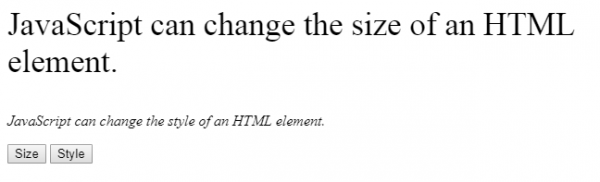
在下面的示例中,使用樣式命令“style.fontSize”和“style.fontStyle”,將提供的文字更改為“35px”的字型大小和“italic”的字型樣式。
<html>
<body>
   <p id="size">JavaScript can change the style of an HTML element.</p>
   <p id="style">JavaScript can change the style of an HTML element.</p>
   <button type="button"
   onclick="document.getElementById('size').style.fontSize='35px'">Size</button>
   <button type="button" onclick="document.getElementById('style')
.style.fontStyle='italic'">Style</button>
</body>
</html>
執行上述程式碼後,瀏覽器上將顯示以下內容。
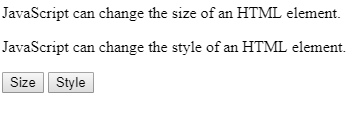
單擊上面的按鈕後,第一個文字將更改為不同的字型大小,第二個文字將更改為不同的字型樣式,如輸出所示。
輸出
示例-2
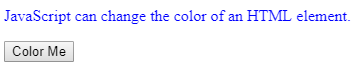
在下面的示例中,使用樣式命令“style.color”將文字顏色更改為藍色。
<html>
<body>
   <p id="color">JavaScript can change the color of an HTML element.</p>
   <button type="button" onclick="document.getElementById('color').
   style.color='blue'">Color Me</button>
</body>
</html>
執行上述程式碼後,瀏覽器視窗上將顯示以下內容。
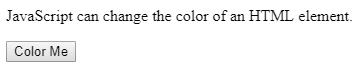
單擊“更改顏色”按鈕後,提供的文字顏色將更改為“藍色”,如輸出所示。
輸出

更新於:2020年6月29日
3K+ 次瀏覽

廣告