
 資料結構
資料結構 網路
網路 RDBMS
RDBMS 作業系統
作業系統 Java
Java MS Excel
 iOS
iOS HTML
HTML CSS
CSS Android
 Python
 C 程式設計
 C++
C++ C#
C# MongoDB
 MySQL
MySQL Javascript
 PHP
PHP 物理
物理 化學
化學 生物
生物 數學
數學 英語
英語 經濟學
經濟學 心理學
心理學 社會研究
社會研究 時裝研究
時裝研究 法律研究
法律研究如何新增 Selenium 的自定義 ExpectedConditions?
我們可以為 Selenium 網頁驅動程式新增自定義 ExpectedConditions。當網路驅動程式提供的預設預期條件不足以滿足某些場景時,我們需要此自定義 ExpectedConditions。
這裡使用 WebDriverWait 類中的 until 方法。在此處,ExpectedConditions 用於等待滿足特定條件。只要發生以下情況之一,此方法就會暫停 −
已過指定的超時持續時間。
定義的條件不為 false 也不為 null。
我們可以透過建立預期條件的物件並藉助 apply 方法來獲取自定義 ExpectedCondition。
讓我們以以下頁面為例。讓我們點選 Team 連結。

在單擊團隊後,相應的一段文字將出現在右側。讓我們驗證該段落是否已顯示,並驗證文字 India 出現該段落中。
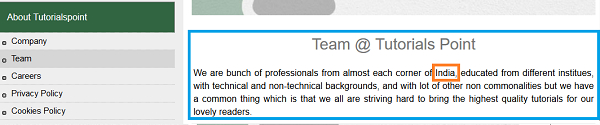
示例
import org.openqa.selenium.WebDriver;
import org.openqa.selenium.WebElement;
import org.openqa.selenium.chrome.ChromeDriver;
import java.util.concurrent.TimeUnit;
import org.openqa.selenium.support.ui.ExpectedConditions;
import org.openqa.selenium.support.ui.WebDriverWait;
public class CustomExpCondition{
   public static void main(String[] args)
      throws InterruptedException{
      System.setProperty("webdriver.chrome.driver",
      "C:\Users\ghs6kor\Desktop\Java\chromedriver.exe");
      WebDriver driver = new ChromeDriver();
      driver.manage().timeouts().implicitlyWait(4, TimeUnit.SECONDS);
      driver.get("https://tutorialspoint.tw/about/about_careers.htm");
      // identify element
      WebElement l=driver.findElement(By.linkText("Team"));
      l.click();
      //object of WebDriverWait class with wait time
      WebDriverWait w = new WebDriverWait(driver,7);
      //custom expected condition with until method
      w.until(new ExpectedCondition <Boolean> (){
         public Boolean apply(WebDriver driver) {
            //identify paragraph
            WebElement e= driver.findElement(By.tagName("p"));
            if (e!= null){
               //to check if paragraph is displayed and has text India
               if (e.isDisplayed() && e.getText().contains("India")) {
                  System.out.println("Element found");
                  return true;
               }
               else {
                  System.out.println("Element not found");
                  return false;
               }
            }
            return false;
         }
      });
      driver.close();
   }
}
輸出


更新時間:01-Feb-2021
1 千個 + 瀏覽

廣告