
 資料結構
資料結構 網路
網路 關係資料庫管理系統
 作業系統
作業系統 Java
Java MS Excel
 iOS
iOS HTML
HTML CSS
CSS Android
 Python
 C 程式設計
 C++
C++ C#
C# MongoDB
 MySQL
MySQL Javascript
 PHP
PHP 物理學
物理學 化學
化學 生物
生物 數學
數學 英語
英語 經濟學
經濟學 心理學
心理學 社會學
社會學 時尚學
時尚學 法律學
法律學如何用 Java 新增具有相對 Y 位置的元件?\n
要新增具有相對 Y 位置的元件,請使用 GridBagConstraints.RELATIVE 常量。將其設定為 gridy 欄位 −
GridBagConstraints constraints = new GridBagConstraints();
constraints.gridy = GridBagConstraints.RELATIVE;
以下是一個如何在 Java 中新增具有相對 Y 位置的元件的示例 −
示例
package my;
import java.awt.GridBagConstraints;
import java.awt.GridBagLayout;
import javax.swing.JButton;
import javax.swing.JFrame;
import javax.swing.JPanel;
public class SwingDemo {
   public static void main(String[] args) {
      JFrame frame = new JFrame();
      frame.setDefaultCloseOperation(JFrame.EXIT_ON_CLOSE);
      JPanel panel = new JPanel();
      panel.setLayout(new GridBagLayout());
      GridBagConstraints constraints = new GridBagConstraints();
      constraints.gridx = 0;
      panel.add(new JButton("1st row"), constraints);
      constraints.gridx = 1;
      constraints.gridy = GridBagConstraints.RELATIVE;
      panel.add(new JButton("1st row 2nd column"), constraints);
      panel.add(new JButton("2nd row 2nd column"), constraints);
      frame.add(panel);
      frame.setSize(550, 300);
      frame.setVisible(true);
   }
}
輸出
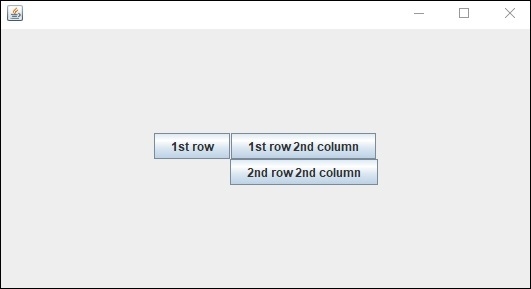

更新於: 2019-7-30
126 次瀏覽

廣告