
 資料結構
資料結構 網路
網路 關係型資料庫管理系統
 作業系統
作業系統 Java
Java MS Excel
 iOS
iOS HTML
HTML CSS
CSS Android
 Python
 C 程式設計
 C++
C++ C#
C# MongoDB
 MySQL
MySQL Javascript
 PHP
PHP 物理
物理 化學
化學 生物
生物 數學
數學 英語
英語 經濟
經濟 心理學
心理學 社會學
社會學 時尚研究
時尚研究 法律研究
法律研究如何在你的網頁中新增背景音樂?
要在網頁上新增背景音樂,可以使用 <embed>…</embed> 元素。同時使用 autoplay 屬性。這樣就可以讓音樂在頁面載入時在背景中播放。
以一種在網頁上隱藏播放器的方式設定寬度和高度。loop 屬性被用來指定音訊是否會重新開始。將音樂檔案新增到伺服器,並在src 屬性中提及連結。
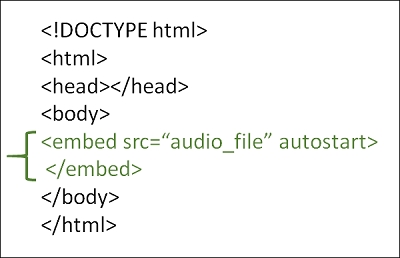
示例
你可以嘗試執行以下程式碼,在你的網頁中新增背景音樂
<!DOCTYPE html>
<html>
   <head>
      <title>HTML background music</title>
   </head>
   <body>
      <p>The music is running in the background.</p>
      <p>(Song: Kalimba which is provided as a Sample Music in Windows)</p>
      <embed src="/html/Kalimba.mp3" loop="true" autostart="true" width="2" height="0">
   </body>
</html>

更新時間: 13-9月-2023
34K+ 訪問量

廣告