
 資料結構
資料結構 網路
網路 RDBMS
RDBMS 作業系統
作業系統 Java
Java MS Excel
 iOS
iOS HTML
HTML CSS
CSS Android
 Python
 C 程式設計
 C++
C++ C#
C# MongoDB
 MySQL
MySQL Javascript
 PHP
PHP 物理
物理 化學
化學 生物
生物 數學
數學 英語
英語 經濟學
經濟學 心理學
心理學 社會研究
社會研究 時尚研究
時尚研究 法律研究
法律研究如何讓 Selenium 識別出頁面已載入?
我們可以讓 Selenium 識別到頁面已載入。我們可以設定隱式等待以實現此目的。它將使驅動程式在頁面載入後等待一段時間才可獲取元素。
語法
driver.manage().timeouts().implicitlyWait();
在頁面載入後,我們還可以呼叫 Javascript 方法 document.readyState 並一直等到返回 complete 為止。
語法
JavascriptExecutor js = (JavascriptExecutor)driver;
js.executeScript("return document.readyState").toString().equals("complete");
接下來,驗證 URL 是否與我們正在尋找的 URL 相匹配。
例項
隱式等待下的程式碼實現。
import org.openqa.selenium.By;
import org.openqa.selenium.WebDriver;
import org.openqa.selenium.WebElement;
import org.openqa.selenium.chrome.ChromeDriver;
import java.util.concurrent.TimeUnit;
public class Pageload{
   public static void main(String[] args) {
      System.setProperty("webdriver.chrome.driver",
      "C:\Users\ghs6kor\Desktop\Java\chromedriver.exe");
      WebDriver driver = new ChromeDriver();
      String url = "https://tutorialspoint.tw/index.htm";
      driver.get(url);
      // wait of 12 seconds
      driver.manage().timeouts().implicitlyWait(12, TimeUnit.SECONDS);
      // identify element, enter text
      WebElement m=driver.findElement(By.id("gsc-i-id1"));
      m.sendKeys("Selenium");
   }
}
例項
Javascript Executor 下的程式碼實現。
import org.openqa.selenium.By;
import org.openqa.selenium.WebDriver;
import org.openqa.selenium.WebElement;
import org.openqa.selenium.chrome.ChromeDriver;
import java.util.concurrent.TimeUnit;
import org.openqa.selenium.JavascriptExecutor;
public class PagaLoadJS{
   public static void main(String[] args) {
      System.setProperty("webdriver.chrome.driver",
      "C:\Users\ghs6kor\Desktop\Java\chromedriver.exe");
      WebDriver driver = new ChromeDriver();
      String url = "https://tutorialspoint.tw/index.htm";
      driver.get(url);
      // Javascript executor to return value
      JavascriptExecutor j = (JavascriptExecutor) driver;
      j.executeScript("return document.readyState")
      .toString().equals("complete");
      // get the current URL
      String s = driver.getCurrentUrl();
      // checking condition if the URL is loaded
      if (s.equals(url)) {
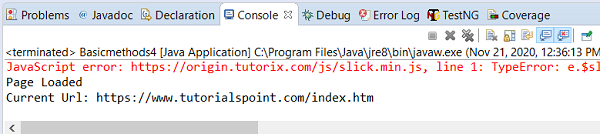
         System.out.println("Page Loaded");
         System.out.println("Current Url: " + s);
      }
      else {
         System.out.println("Page did not load");
      }
      driver.quit();
   }
}
輸出

更新於: 2020 年 11 月 28 日
9K+ 瀏覽

廣告