
 資料結構
資料結構 網路
網路 RDBMS
RDBMS 作業系統
作業系統 Java
Java MS Excel
 iOS
iOS HTML
HTML CSS
CSS Android
 Python
 C 程式設計
 C++
C++ C#
C# MongoDB
 MySQL
MySQL Javascript
 PHP
PHP 物理學
物理學 化學
化學 生物學
生物學 數學
數學 英語
英語 經濟學
經濟學 心理學
心理學 社會學
社會學 時尚研究
時尚研究 法律研究
法律研究我們如何使用 span 標籤 ? 為 HTML 元素新增樣式?
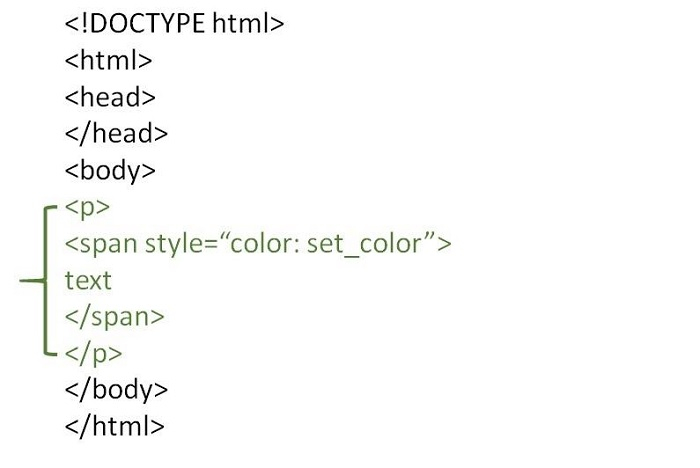
我們使用 <span> 標籤來為文字的一部分或文件的一部分新增顏色。此標籤主要用於將相似的內容組合在一起,以便於新增樣式。我們為 <span> 標籤使用行內樣式,因為它為行內元素應用樣式。
如果我們希望讓某些文字或任何其他內容與其他內容不同,我們將它們包裝在 <span> 標籤中,然後新增 class 屬性來識別,然後新增屬性值來新增樣式。
語法
以下是 <span> 標籤的語法。
<span class=" ">Text…</span>
示例 1
下面給出了使用 span 標籤為 HTML 元素新增樣式的示例。
<!DOCTYPE html>
<html>
<head>
   <meta charset="UTF-8">
   <meta http-equiv="X-UA-Compatible" content="IE=edge">
   <meta name="viewport" content="width=device-width, initial-scale=1.0">
</head>
<body>
   <p>
      <span style="color:green;font-weight:bolder">
         Major Sandeep Unnikrishnan</span>was an officer in the Indian Army serving in the elite 51 Special Action Group of the National Security Guards. He was martyred in action during the November 2008 Mumbai attacks.
      <span style="background-color: yellow;"> He was consequently awarded the Ashoka Chakra, India's highest peacetime gallantry award, on 26 January 2009 by the president Pratibha Patil.</span>
   </p>
</body>
</html>
以下是上述示例程式的輸出。
示例 2
下面給出了使用 span 標籤為 HTML 元素新增樣式的示例。
<!DOCTYPE html>
<html>
<head>
   <meta charset="UTF-8">
   <meta http-equiv="X-UA-Compatible" content="IE=edge">
   <meta name="viewport" content="width=device-width, initial-scale=1.0">
</head>
<body>
   <p>
      <span style="text-transform: uppercase; font-weight:bolder">
      Major Sandeep Unnikrishnan</span> was an officer in the Indian Army serving in the elite 51 Special Action Group of the National Security Guards. He was martyred in action during the November 2008 Mumbai attacks.
      <span style="font-family:cursive; color: green"> He was consequently awarded the Ashoka Chakra, India's highest peacetime gallantry award, on 26 January 2009 by the president Pratibha Patil.</span>
   </p>
</body>
</html>
以下是上述示例程式的輸出。
示例 3
你可以嘗試執行以下程式碼來了解 <span> 標籤的用法。在此,我們將在 <p> 標籤中使用 <span> 標籤。
<!DOCTYPE html>
<html>
<head>
   <title>HTML span Tag</title>
</head>
<body>
   <p>Java is a Programming language widely followed. <span style = "color:#FF0000;">Developed by James Gosling. </span>This is demo text.</p>
   <p>
   <span style = "color:#8866ff;">
   Current Version: 1.8 </span> </p>
</body>
</html>

更新日期: 2022 年 10 月 19 日
2K+ 瀏覽量

廣告