
 資料結構
資料結構 網路
網路 關係型資料庫管理系統
 作業系統
作業系統 Java
Java MS Excel
 iOS
iOS HTML
HTML CSS
CSS Android
 Python
 C 語言程式設計
 C++
C++ C#
C# MongoDB
 MySQL
MySQL Javascript
 PHP
PHP 物理學
物理學 化學
化學 生物學
生物學 數學
數學 英語
英語 經濟學
經濟學 心理學
心理學 社會科學
社會科學 時尚學
時尚學 法律學
法律學如何在 Java 中實現 JOptionPane 訊息對話方塊的長文字?
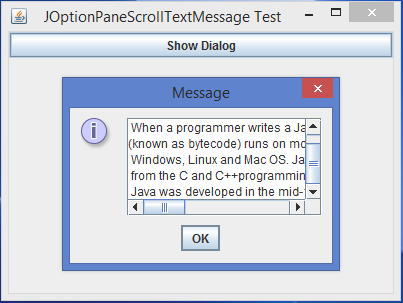
JOptionPane 是 JComponent 類的子類,其中包括用來建立和定製**模態** **對話方塊** **框** 的靜態方法。可以使用 **JOptionPane 類來代替 **JDialog 類來最小化程式碼的複雜性。JOptionPane 顯示具有四個標準圖示之一的對話方塊框(問號、資訊、警告和錯誤),還可以顯示使用者指定的自定義圖示。預設情況下,JOptionPane 訊息對話方塊可以支援**單行文字,**我們還可以透過定製 JTextArea 類來實現一個帶**長文字** 的 JOptionPane 訊息對話方塊。
示例
import java.awt.*;
import java.awt.event.*;
import javax.swing.*;
public class JOptionPaneScrollTextMessage extends JFrame {
   private JButton btn;
   String msg;
   public JOptionPaneScrollTextMessage() {
      setTitle("JOptionPaneScrollTextMessage Test");
      msg = " Java is a programming language that produces software for multiple platforms.\n When a       programmer writes a Java application, the compiled code\n" + "(known as bytecode) runs on most       operating systems (OS), including \n Windows, Linux and Mac OS. Java derives much of its syntax       \n from the C and C++" + "programming languages.\n Java was developed in the mid-1990s by James       A. Gosling, a former computer scientist with Sun Microsystems.";
      btn = new JButton("Show Dialog");
      btn.addActionListener(new ActionListener() {
         public void actionPerformed(ActionEvent ae) {
            JTextArea jta = new JTextArea(5, 15);
            jta.setText(msg);
            jta.setEditable(false);
            JScrollPane jsp = new JScrollPane(jta);
            JOptionPane.showMessageDialog(null, jsp);
         }
      });
      add(btn, BorderLayout.NORTH);
      setSize(400, 300);
      setDefaultCloseOperation(JFrame.EXIT_ON_CLOSE);
      setLocationRelativeTo(null);
      setVisible(true);
   }
   public static void main(String[] args) {
      new JOptionPaneScrollTextMessage();
   }
}
輸出

更新日期:2020 年 2 月 10 日
455 次瀏覽

廣告