
 資料結構
資料結構 網路
網路 RDBMS
RDBMS 作業系統
作業系統 Java
Java MS Excel
 iOS
iOS HTML
HTML CSS
CSS Android
 Python
 C語言
C語言 C++
C++ C#
C# MongoDB
 MySQL
MySQL JavaScript
 PHP
PHP 物理
物理 化學
化學 生物
生物 數學
數學 英語
英語 經濟學
經濟學 心理學
心理學 社會科學
社會科學 時尚研究
時尚研究 法律研究
法律研究如何在Python中使用Selenium和Beautifulsoup解析網站?
我們可以在Python中使用Selenium和Beautiful Soup解析網站。Web爬取是一個從網頁中提取內容的概念,廣泛用於資料科學和指標準備。在Python中,它透過BeautifulSoup軟體包實現。
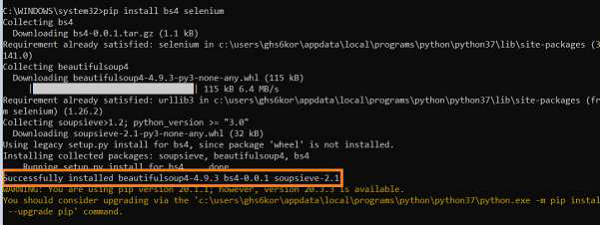
要獲得BeautifulSoup和Selenium,我們應該執行命令−
pip install bs4 selenium
讓我們抓取頁面上出現的以下連結 −
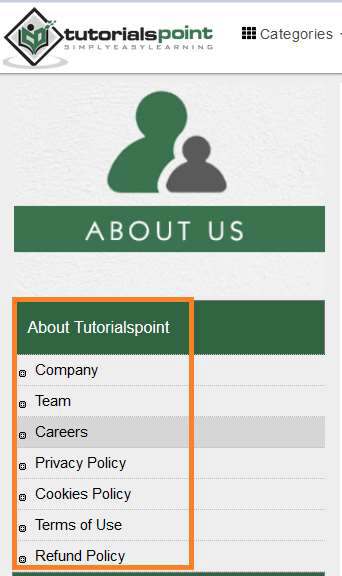
然後調查上述元素的html結構 −

示例
from selenium import webdriver
from bs4 import BeautifulSoup
#path of chromedriver.exe
driver = webdriver.Chrome (executable_path="C:\chromedriver.exe")
#launch browser
driver.get ("https://tutorialspoint.tw/about/about_careers.htm")
#content whole page in html format
s = BeautifulSoup(driver.page_source, 'html.parser')
#access to specific ul element with BeautifulSoup methods
l = s.find('ul', {'class':'toc chapters'})
#get all li elements under ul
rs = l.findAll('li')
for r in rs:
#get text of li elements
   print(r.text)
輸出


更新於:2021年1月30日
2K+ 次瀏覽

廣告