
 資料結構
資料結構 網路
網路 關係型資料庫管理系統
 作業系統
作業系統 Java
Java MS Excel
 iOS
iOS HTML
HTML CSS
CSS Android
 Python
 C 語言程式設計
 C++
C++ C#
C# MongoDB
 MySQL
MySQL Javascript
 PHP
PHP 物理學
物理學 化學
化學 生物學
生物學 數學
數學 英語
英語 經濟學
經濟學 心理學
心理學 社會學
社會學 服裝設計
服裝設計 法律研究
法律研究如何在 Swift 中使按鈕具有圓角邊框?
在 Swift 中,您可以使用 UIButton 的 layer 屬性來設定其邊框的圓角半徑。您可以使用 layer (CALayer) 屬性來應用邊框寬度和顏色到按鈕。此外,相同的屬性提供了訪問 cornerRadius 屬性以使按鈕變圓的功能。
我們將使用以下步驟使按鈕具有圓角和邊框
步驟 1 − 在此步驟中,建立具有基本自定義的按鈕物件。
步驟 2 − 在此步驟中,向按鈕新增邊框和圓角半徑。
步驟 3 − 在此步驟中,使按鈕變圓。
示例
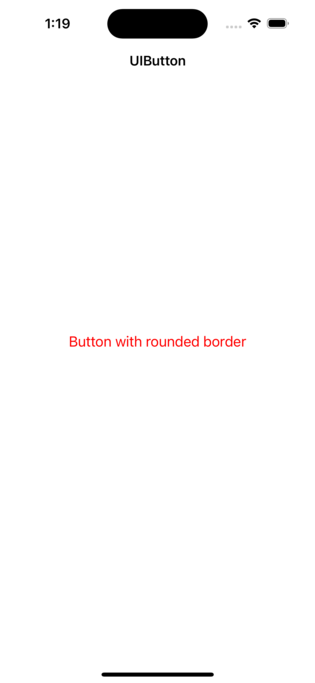
在此步驟中,您將建立一個按鈕並進行一些基本自定義。以下是程式碼。
import UIKit
class TestController: UIViewController {
   private let loginButton = UIButton()
   override func viewDidLoad() {
      super.viewDidLoad()
      initialSetup()
   }
   private func initialSetup() {
      // basic setup
      view.backgroundColor = .white
      navigationItem.title = "UIButton"

      // log in button customization
      loginButton.setTitle("Button with rounded border", for: .normal)
      loginButton.setTitleColor(.red, for: .normal)

      // adding the constraints to the login button
      view.addSubview(loginButton)
      loginButton.translatesAutoresizingMaskIntoConstraints = false
      loginButton.centerYAnchor.constraint(equalTo: view.centerYAnchor).isActive = true
      loginButton.centerXAnchor.constraint(equalTo: view.centerXAnchor).isActive = true
      loginButton.heightAnchor.constraint(equalToConstant: 50).isActive = true
      loginButton.widthAnchor.constraint(equalToConstant: 280).isActive = true
   }
}
輸出
新增邊框和圓角半徑
在此步驟中,我們將向按鈕應用圓角半徑和邊框寬度。以下是一個示例 -
示例
private func initialSetup() {
   // basic setup

   // log in button customization

   // adding the constraints to the login button

   addButtonBorder()
}
private func addButtonBorder() {
   loginButton.layer.borderColor = UIColor.red.cgColor
   loginButton.layer.borderWidth = 1.5
   loginButton.layer.cornerRadius = 10.0
   loginButton.layer.masksToBounds = true
}
輸出
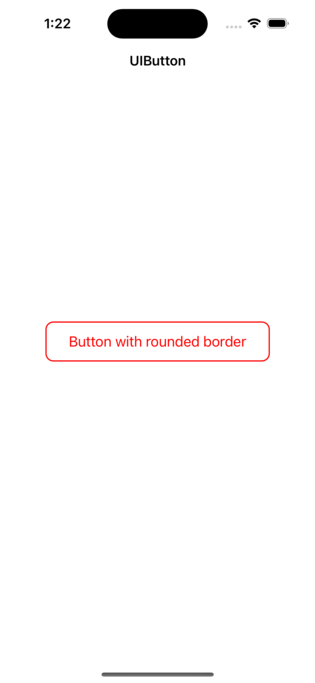
使按鈕具有圓角和邊框
在此步驟中,我們將使按鈕具有圓角和邊框。以下是一個示例 -
示例
private func initialSetup() {
   // basic setup
   // log in button customization
   // adding the constraints to the login button
   makeButtonRounded()
}
private func makeButtonRounded() {
   loginButton.layer.borderColor = UIColor.red.cgColor
   loginButton.layer.borderWidth = 1.5
   loginButton.layer.cornerRadius = 25.0 // height / 2
   loginButton.layer.masksToBounds = true
}
輸出
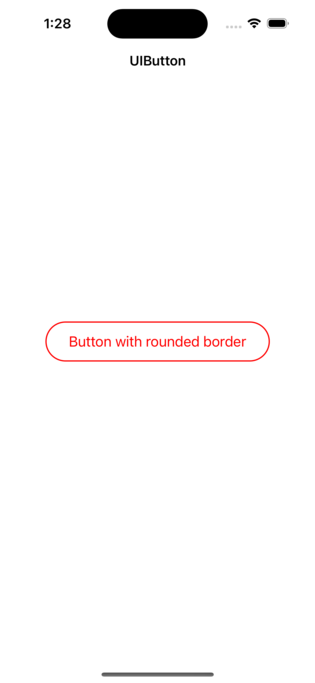
結論
總之,要在 Swift 中使按鈕具有圓角邊框,您可以使用 UIButton 的 layer 屬性來設定圓角半徑、邊框寬度和邊框顏色。

更新於: 2023年2月28日
6K+ 瀏覽量

廣告