
 資料結構
資料結構 網路
網路 關係型資料庫管理系統 (RDBMS)
 作業系統
作業系統 Java
Java MS Excel
 iOS
iOS HTML
HTML CSS
CSS Android
 Python
 C 程式設計
 C++
C++ C#
C# MongoDB
 MySQL
MySQL Javascript
 PHP
PHP 物理
物理 化學
化學 生物
生物 數學
數學 英語
英語 經濟學
經濟學 心理學
心理學 社會學
社會學 服裝設計
服裝設計 法律研究
法律研究使用 Cypress 處理警告
與 Selenium 或 Protractor 等其他自動化工具不同,Cypress 有一種獨特的方式來處理警告。Cypress 基本上會自動接受警告,我們無需編寫邏輯來處理它們。
彈出視窗有兩種型別:警告彈出視窗(只有“確定”按鈕)和確認彈出視窗(有“確定”和“取消”按鈕)。Cypress 的設計使得它會在彈出視窗上點選“確定”按鈕,無需任何手動干預。它具有觸發瀏覽器事件的功能。
示例
處理警告的程式碼實現。
describe('Tutorialspoint Test', function () {
   // test case
   it('Test Case3', function (){
      // launch the url
      cy.visit("https://register.rediff.com/register/register.php?FormName=user_details");
      // click on submit button to produce the alert pop up
      cy.get('input[type="submit"]').click();
   });
});
在執行上述程式碼時,我們沒有發現任何警告的出現,因為測試用例正在執行,但是測試日誌清楚地顯示了警告訊息的證據。
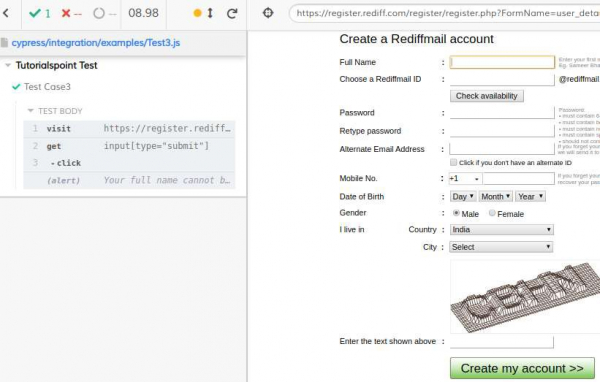
現在如何驗證警告彈出視窗上的文字?瀏覽器在彈出視窗開啟時會觸發一個 **window: alert** 事件。此事件可用於驗證警告文字。Cypress 預設情況下會接受此警告,並且我們無法在不觸發瀏覽器事件的情況下修改此行為。
Cypress 將使用 on() 方法觸發 **window:alert** 事件,然後捕獲警告上的文字(稍後可以透過斷言進行驗證),但整個事件將不會在螢幕上顯示。
示例
警告文字驗證的程式碼實現。
describe('Tutorialspoint Test', function () {
   // test case
   it('Test Case3', function (){
      // launch the url
      cy.visit("https://register.rediff.com/register/register.php?FormName=user_details");
      // click on submit button to produce the alert pop up
      cy.get('input[type="submit"]').click();
      // firing window: alert event with on() method
      cy.on('window:alert',(txt)=>{
         //Mocha assertions
         expect(txt).to.contains('Your full name cannot be blank.');
      })
   });
});
透過檢查測試執行程式日誌,我們將找到警告彈出視窗的詳細資訊。
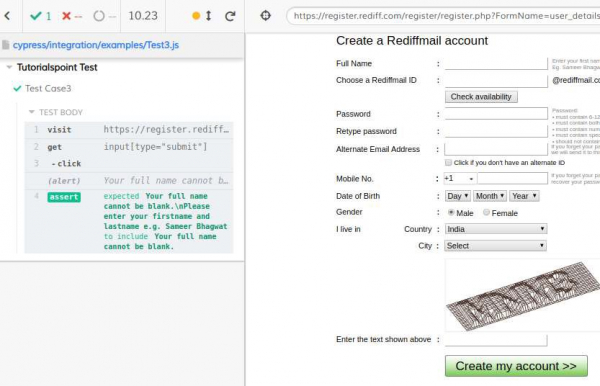
現在如何驗證確認警告彈出視窗上的文字?瀏覽器在確認彈出視窗開啟時會觸發一個 **window: confirm** 事件。此事件將返回 false 以取消確認。Cypress 預設情況下會接受確認。
Cypress 將使用 on() 方法觸發 **window:confirm** 事件,然後捕獲警告上的文字(稍後可以透過斷言進行驗證),但整個事件將不會在螢幕上顯示。
示例
確認彈出視窗文字驗證的程式碼實現。
describe('Tutorialspoint Test', function () {
   // test case
   it('Test Case3', function (){
      // launch the url
      cy.visit("https://tutorialspoint.tw/selenium      /selenium_automation_practice.htm");
      // click on submit button to produce the confirmation alert pop up
      cy.get('button[name="submit"]').click();
      // firing window: alert event with on() method
      cy.on('window:confirm',(txt)=>{
         //Mocha assertions
         expect(txt).to.contains('You are submitting information to an external page.');
      })
   });
});
透過檢查測試執行程式日誌,我們將找到確認彈出視窗的詳細資訊。

更新於: 2020年8月5日
2K+ 瀏覽量

廣告