
 Data Structure
 Networking
 RDBMS
RDBMS Operating System
 Java
Java MS Excel
 iOS
iOS HTML
HTML CSS
CSS Android
 Python
 C Programming
 C++
C++ C#
C# MongoDB
 MySQL
MySQL Javascript
 PHP
PHP Physics
 Chemistry
 Biology
 Mathematics
 English
 Economics
 Psychology
 Social Studies
 Fashion Studies
 Legal Studies
使用 JSONPath 提取值的方法。
我們可以使用 Rest Assured 中的 JsonPath 來提取值。這是藉助 jsonPath 方法(即 JsonPath 類的一部分)完成的。然後,我們需要使用 get 方法並傳遞要從 JSON 響應中獲取的鍵。
我們首先將透過 Postman 向端點發送 GET 請求,並觀察 JSON 響應。這裡,鍵是 userId、id、title 和 body。

示例
程式碼實施
import org.testng.annotations.Test;
import static io.restassured.RestAssured.*;
import io.restassured.RestAssured;
import io.restassured.http.ContentType;
import io.restassured.path.json.JsonPath;
import io.restassured.response.Response;
public class NewTest {
   @Test
   void getValueJsonPath() {

      //base URL
      RestAssured.baseURI = "https://jsonplaceholder.typicode.com";
      RestAssured.basePath = "/posts";

      //obtain a response in JSON
      Response r = given().contentType(ContentType.JSON)

      .log().all().get("/2");
      //JsonPath class
      JsonPath p = r.jsonPath();

      //get JSON fields
      String u = p.getString("userId");
      String i = p.getString("id");
      String t = p.get("title");
      String b = p.get("body");
      System.out.println("User Id: " + u);
      System.out.println("Id: " + i);
      System.out.println("Title: " + t);
      System.out.println("Body: " + b);
   }
}
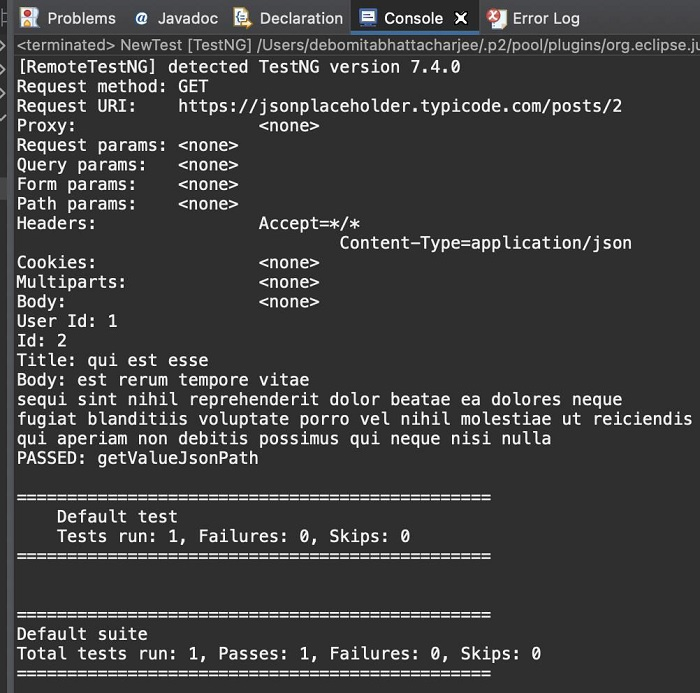
輸出

更新日期:2021 年 11 月 22 日
3k+ 次瀏覽

廣告