
 資料結構
資料結構 網路
網路 關係型資料庫管理系統
 作業系統
作業系統 Java
Java MS Excel
 iOS
iOS HTML
HTML CSS
CSS Android
 Python
 C 程式設計
 C++
C++ C#
C# MongoDB
 MySQL
MySQL Javascript
 PHP
PHP 物理
物理 化學
化學 生物
生物 數學
數學 英語
英語 經濟學
經濟學 心理學
心理學 社會學
社會學 時尚學
時尚學 法律研究
法律研究確定如何使用 CSS 向用戶提示未顯示的溢位內容
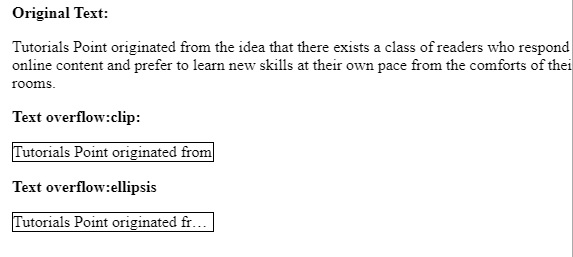
`text-overflow` 屬性用於確定如何使用 CSS 向用戶提示未顯示的溢位內容。
示例
你可以嘗試執行以下程式碼,在 CSS 中實現 `text-overflow` 屬性
<html>
   <head>
      <style>
         p.text1 {
            white-space: nowrap;
            width: 200px;
            border: 1px solid #000000;
            overflow: hidden;
            text-overflow: clip;
         }
         p.text2 {
            white-space: nowrap;
            width: 200px;
            border: 1px solid #000000;
            overflow: hidden;
            text-overflow: ellipsis;
         }
      </style>
   </head>
   <body>
      <b>Original Text:</b>
      <p>Tutorials Point originated from the idea that there exists a class of
      readers who respond better to online content and prefer to learn new skills at
      their own pace from the comforts of their drawing rooms.</p>
      <b>Text overflow:clip:</b>

      <p class = "text1">Tutorials Point originated from the idea that there exists
      a class of readers who respond better to online content and prefer to learn
      new skills at their own pace from the comforts of their drawing rooms.</p>
      <b>Text overflow:ellipsis</b>

      <p class = "text2">Tutorials Point originated from the idea that there exists
      a class of readers who respond better to online content and prefer to learn
      new skills at their own pace from the comforts of their drawing rooms.</p>
   </body>
</html>
輸出

更新於: 20-Jun-2020
83 次瀏覽

廣告