
 資料結構
資料結構 網路
網路 關係資料庫管理系統 (RDBMS)
 作業系統
作業系統 Java
Java MS Excel
 iOS
iOS HTML
HTML CSS
CSS Android
 Python
 C語言程式設計
 C++
C++ C#
C# MongoDB
 MySQL
MySQL Javascript
 PHP
PHP 物理學
物理學 化學
化學 生物學
生物學 數學
數學 英語
英語 經濟學
經濟學 心理學
心理學 社會學
社會學 時尚研究
時尚研究 法學研究
法學研究將SD卡連線到Arduino並獲取卡資訊
在本教程中,我們將Arduino Uno連線到SD卡並提取卡資訊。
電路圖
電路圖如下所示:
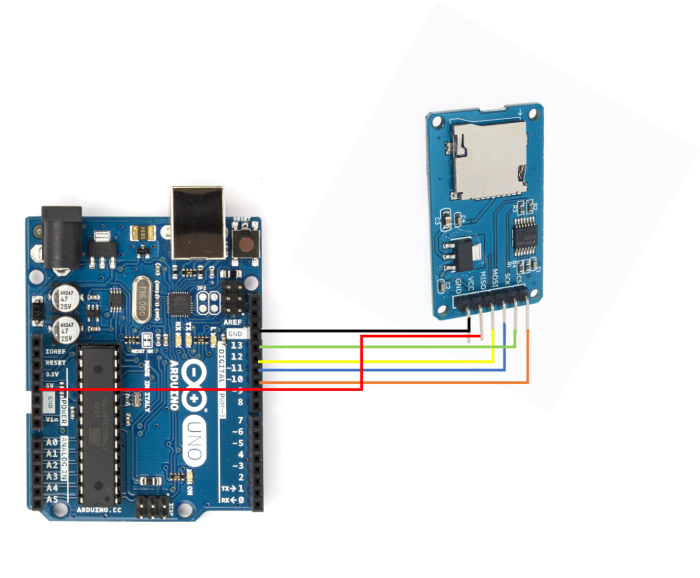
如您所見,您需要進行以下連線:
| SD卡座 | Arduino Uno |
|---|---|
| Vcc | 5V |
| GND | GND |
| MISO | 12 |
| MOSI | 11 |
| SCK | 13 |
| CS | 10 |
只有對於Vcc,請確保您的SD卡座輸入電壓為5V。如果輸入電壓為3.3V,請將其連線到Arduino Uno上的3.3V引腳。
程式碼詳解
我們將逐步講解內建SD庫附帶的示例程式碼。您可以從檔案→示例→SD→CardInfo中訪問它。

或者,您也可以在GitHub上訪問它:https://github.com/arduinolibraries/SD/blob/master/examples/CardInfo/CardInfo.ino
我們首先包含SPI和SD庫:
#include <SPI.h>
#include <SD.h>
接下來,我們根據SD庫中定義的物件定義一些變數。
Sd2Card card;
SdVolume volume;
SdFile root;
接下來,我們定義晶片選擇引腳。示例程式碼將晶片選擇設定為4號引腳。但是,我們將CS引腳連線到Arduino Uno的10號引腳。因此,我們將更改它。
const int chipSelect = 10;
在Setup中,我們首先初始化Serial,然後初始化SD卡(使用晶片選擇引腳和SPI協議,SPI協議的其他引腳MISO、MOSI、SCK在SPI庫中預設定義)。
void setup() {
   // Open serial communications and wait for port to open:
   Serial.begin(9600);
   while (!Serial) {
      ; // wait for serial port to connect. Needed for native USB port only
   }

   Serial.print("
Initializing SD card...");

   // we'll use the initialization code from the utility libraries
   // since we're just testing if the card is working!
   if (!card.init(SPI_HALF_SPEED, chipSelect)) {
      Serial.println("initialization failed. Things to check:");
      Serial.println("* is a card inserted?");
      Serial.println("* is your wiring correct?");
      Serial.println("* did you change the chipSelect pin to match your
      shield or module?");
      while (1);
   } else {
      Serial.println("Wiring is correct and a card is present.");
}
接下來,我們使用.type()函式獲取並列印卡的型別。
   // print the type of card
   Serial.println();
   Serial.print("Card type: ");
   switch (card.type()) {
      case SD_CARD_TYPE_SD1:
         Serial.println("SD1");
         break;
      case SD_CARD_TYPE_SD2:
         Serial.println("SD2");
         break;
      case SD_CARD_TYPE_SDHC:
         Serial.println("SDHC");
         break;
      default:
         Serial.println("Unknown");
}
接下來,我們初始化卡的卷,獲取卡中的簇總數和每個簇的塊數,從而獲得卡中的塊總數。
// Now we will try to open the 'volume'/'partition' - it should be
FAT16 or FAT32
   if (!volume.init(card)) {
      Serial.println("Could not find FAT16/FAT32 partition.
Make sure you've formatted the card");
      while (1);
   }

   Serial.print("Clusters: ");
   Serial.println(volume.clusterCount());
   Serial.print("Blocks x Cluster: ");
   Serial.println(volume.blocksPerCluster());

   Serial.print("Total Blocks: ");
   Serial.println(volume.blocksPerCluster() * volume.clusterCount());

   Serial.println();
之後,我們列印卷是FAT 16還是FAT 32型別。此外,我們還計算總容量(以kB為單位),利用一個塊始終為512位元組或0.5 kB這一事實。
   // print the type and size of the first FAT-type volume
   uint32_t volumesize;
   Serial.print("Volume type is: FAT");
   Serial.println(volume.fatType(), DEC);
   volumesize = volume.blocksPerCluster(); // clusters are collections of blocks
   volumesize *= volume.clusterCount(); // we'll have a lot of clusters
   volumesize /= 2; // SD card blocks are always 512 bytes (2 blocks are 1KB)
   Serial.print("Volume size (Kb): ");
   Serial.println(volumesize);
   Serial.print("Volume size (Mb): ");
   volumesize /= 1024;
   Serial.println(volumesize);
   Serial.print("Volume size (Gb): ");
   Serial.println((float)volumesize / 1024.0);
最後,我們使用openRoot()函式列出卡上找到的所有檔案,並列印日期、大小以及檔名。
Serial.println("
Files found on the card (name, date and size in bytes): ");
   root.openRoot(volume);

// list all files in the card with date and size
root.ls(LS_R | LS_DATE | LS_SIZE);

更新於:2021年5月29日
瀏覽量:357

廣告