
 資料結構
資料結構 網路
網路 關係型資料庫管理系統
 作業系統
作業系統 Java
Java MS Excel
 iOS
iOS HTML
HTML CSS
CSS Android
 Python
 C 程式設計
 C++
C++ C#
C# MongoDB
 MySQL
MySQL Javascript
 PHP
PHP 物理學
物理學 化學
化學 生物學
生物學 數學
數學 英語
英語 經濟學
經濟學 心理學
心理學 社會學
社會學 時尚研究
時尚研究 法律研究
法律研究在 Arduino 中檢查字元是否可列印
透過各種操作,您可能會遇到不可列印的字元。畢竟,一個 char 是一個 8 位數字,如果您檢視 ASCII 表格 (https://www.cs.cmu.edu/~pattis/15-1XX/common/handouts/ascii.html), 只有從 32 到 127 的值,或者總共 96 個值中的 127 個是可列印的(參見 http://facweb.cs.depaul.edu/sjost/it212/documents/ascii-pr.htm). ASCII 只使用 7 位數字,而不是 8 位。
因此,如果您從函式獲得 char 輸出,並希望檢查它是否可列印,則可以使用 Arduino 的 isPrintable() 函式。
語法
isPrintable(myChar)
其中 **myChar** 是要檢查的字元。如果字元可列印,則此函式返回 true。
示例
void setup() {
   // put your setup code here, to run once:
   Serial.begin(9600);
   Serial.println();
   char c1 = 'a';
   char c2 = 6;
   char c3 = 56;

   if (isPrintable(c1)) {
      Serial.println("c1 is printable!");
   } else {
      Serial.println("c1 is not printable!");
   }

   if (isPrintable(c2)) {
      Serial.println("c2 is printable!");
   } else {
      Serial.println("c2 is not printable!");
   }

   if (isPrintable(c3)) {
      Serial.println("c3 is printable!");
   } else {
      Serial.println("c3 is not printable!");
   }
}

void loop() {
   // put your main code here, to run repeatedly:
}
輸出
序列埠監視器輸出如下所示:
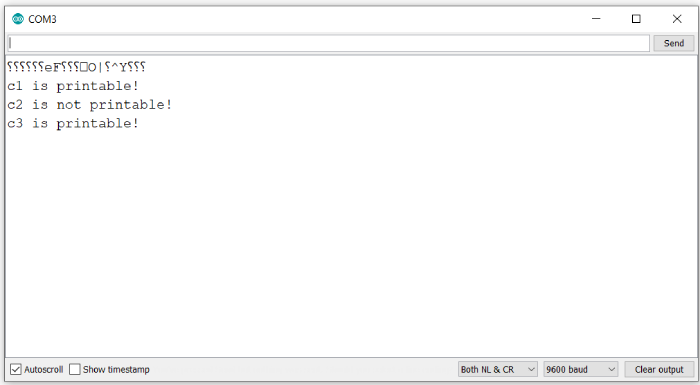
如您所見,字元 c2(對應於數字 6 的 ASCII 等效值)不可列印。您可以從 ASCII 表格中檢查它對應於 ACK。類似地,56 對應於數字 8 的字元表示形式。因此,它是可列印的。

更新於: 2021-05-31
379 次檢視

廣告