
 資料結構
資料結構 網路
網路 RDBMS
RDBMS 作業系統
作業系統 Java
Java MS Excel
 iOS
iOS HTML
HTML CSS
CSS Android
 Python
 C 程式設計
 C++
C++ C#
C# MongoDB
 MySQL
MySQL Javascript
 PHP
PHP 物理
物理 化學
化學 生物
生物 數學
數學 英語
英語 經濟學
經濟學 心理學
心理學 社會學
社會學 時尚學
時尚學 法律學
法律學C 語言箭頭星形圖案程式
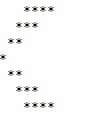
給定一個數 n,我們必須列印最多 n 個星號的箭頭星形圖案。
輸入 4 的星形圖案如下所示 −
示例
Input: 3
Output:

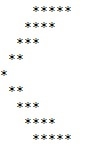
Input: 5
Output:
下面使用的方法如下 −
- 以整型輸入。
- 然後列印 n 個空格和 n 個星號。
- 遞減至 n>1。
- 現在增量至 n。
- 並按升序列印空格和星號。
演算法
Start
In function int arrow(int num)
   Step 1-> declare and initialize i, j
   Step 2-> Loop For i = 1 and i <= num and i++
      Loop For j = i and j < num and j++
         Print a space
      Loop For j = i and j <= num and j++
         Print "*"
         Print newline
   Step 3-> Loop For i = 2 and i <= num and i++
      Loop For j= 1 and j < I and j++
         Print a space
      Loop For j = 1 and j <= i and j++
         Print "*"
         Print newline
In function int main()
   Step 1-> declare and initialize num = 4
   Step 2-> call arrow(num)
示例
#include <stdio.h>
// arrow function
int arrow(int num) {
   int i, j;
   // Prints the upper part of the arrow
   for (i = 1; i <= num; i++) {
      // to print the spaces
      for (j = i; j < num; j++) {
         printf(" ");
      }
      // to print the * for the pattern
      for (j = i; j <= num; j++) {
         printf("*");
      }
      printf("
");
   }
   // Prints lower part of the arrow
   for (i = 2; i <= num; i++) {
      // to print the spaces
      for (j = 1; j < i; j++) {
         printf(" ");
      }
      // to print the * for the pattern
      for (j = 1; j <= i; j++) {
         printf("*");
      }
      printf("
");
   }
   return 0;
}
int main() {
   // get the value from user
   int num = 4;
   // function calling
   arrow(num);
   return 0;
}
輸出
如果執行上述程式碼,它將生成以下輸出 −

更新日期:2019 年 10 月 21 日
1K+ 次瀏覽

廣告