
 資料結構
資料結構 網路
網路 RDBMS
RDBMS 作業系統
作業系統 Java
Java MS Excel
 iOS
iOS HTML
HTML CSS
CSS Android
 Python
 C 程式設計
 C++
C++ C#
C# MongoDB
 MySQL
MySQL Javascript
 PHP
PHP 物理學
物理學 化學
化學 生物學
生物學 數學
數學 英語
英語 經濟學
經濟學 心理學
心理學 社會學
社會學 服裝設計
服裝設計 法律研究
法律研究用Java構建計算表示式遊戲
任務是構建一個應用程式,該應用程式顯示一個表示式並提示使用者輸入答案。一旦您輸入解決方案,就會顯示一個新的表示式,並且這些表示式會不斷變化。在一定時間後,對各個應用程式給出的解決方案進行評估,並顯示準確答案的總數。
遊戲中的方法(使用者定義)
本節將引導您瞭解實現中包含的方法(和建構函式)及其在“計算表示式遊戲”中的作用。
CalculateExpressionGame()
這是 CalculateExpressionGame 類的建構函式。它透過建立和配置 Swing 元件(例如 JLabel、JTextField、JButton 和 JLabel)來設定遊戲視窗,以顯示錶達式和結果。它還為提交按鈕設定了動作監聽器。
public CalculateExpressionGame() {
   super("Calculate Expression Game");
   setDefaultCloseOperation(JFrame.EXIT_ON_CLOSE);
   setLayout(new FlowLayout());

   // Create and configure the Swing components
   expressionLabel = new JLabel();
   expressionLabel.setFont(new Font("Arial", Font.BOLD, 18));
   add(expressionLabel);

   answerTextField = new JTextField(10);
   add(answerTextField);

   submitButton = new JButton("Submit");
   add(submitButton);

   resultLabel = new JLabel();
   resultLabel.setFont(new Font("Arial", Font.BOLD, 18));
   add(resultLabel);

   // Add an ActionListener to the Submit button
   submitButton.addActionListener(new ActionListener() {
      @Override
      public void actionPerformed(ActionEvent e) {
         checkAnswer();
      }
   });

   pack();
   setLocationRelativeTo(null);
   setVisible(true);
}
startGame(int timeLimit) 此方法透過初始化遊戲變數(如 totalTime、numQuestions 和 numCorrect)來啟動遊戲。它呼叫 generateQuestion() 方法來顯示第一個算術表示式。它還建立並啟動一個計時器來跟蹤剩餘時間。如果時間用完,則呼叫 endGame() 方法。
public void startGame(int timeLimit) {
   totalTime = timeLimit;
   numQuestions = 0;
   numCorrect = 0;
   generateQuestion();

   // Create and start a Timer to track the remaining time
   timer = new Timer(1000, new ActionListener() {
   @Override
   public void actionPerformed(ActionEvent e) {
      totalTime--;
      if (totalTime >= 0) {
         setTitle("Calculate Expression Game - Time: " + totalTime);
      } else {
         endGame();
      }
   }
   });
   timer.start();
}
generateQuestion()此方法透過生成隨機數和運算子來生成隨機算術表示式。它更新 expressionLabel 以顯示生成的表示式,並清除 answerTextField 以供使用者輸入。它還會遞增 numQuestions 計數器。
private void generateQuestion() {
   // Generate random numbers and operator for the expression
   int num1 = (int) (Math.random() * 10) + 1;
   int num2 = (int) (Math.random() * 10) + 1;
   int operatorIndex = (int) (Math.random() * 3);
   String operator = "";
   int result = 0;

   // Determine the operator based on the randomly generated index
   switch (operatorIndex) {
      case 0:
         operator = "+";
         result = num1 + num2;
         break;
      case 1:
         operator = "-";
		 result = num1 - num2;
		 break;
      case 2:
         operator = "*";
         result = num1 * num2;
         break;
}
checkAnswer()當用戶單擊提交按鈕時,會呼叫此方法。它透過從 answerTextField 解析整數值來檢查使用者的答案。然後,它透過呼叫 evaluateExpression() 方法來評估 expressionLabel 中顯示的表示式。如果使用者的答案與計算結果匹配,則遞增 numCorrect 計數器。之後,它呼叫 generateQuestion() 以生成一個新問題。
private void checkAnswer() {
   try {
      // Parse the user's answer from the text field
      int userAnswer = Integer.parseInt(answerTextField.getText());
      int result = evaluateExpression(expressionLabel.getText());

      // Check if the user's answer is correct and update the count
      if (userAnswer == result) {
         numCorrect++;
      }
   } catch (NumberFormatException e) {
      // Invalid answer format
   }
   // Generate a new question
   generateQuestion();
}
evaluateExpression(String expression)此方法以字串引數的形式接收算術表示式並對其進行評估以獲得結果。它使用空格作為分隔符將表示式拆分為其元件(num1、operator、num2)。它將 num1 和 num2 轉換為整數,並應用運算子執行算術運算。返回結果值。
private int evaluateExpression(String expression) {
   // Split the expression into parts: num1, operator, num2
   String[] parts = expression.split(" ");
   int num1 = Integer.parseInt(parts[0]);
   String operator = parts[1];
   int num2 = Integer.parseInt(parts[2]);

   int result = 0;
   // Evaluate the expression based on the operator
   switch (operator) {
      case "+":
         result = num1 + num2;
         break;
      case "-":
         result = num1 - num2;
         break;
      case "*":
         result = num1 * num2;
         break;
   }
   return result;
}
endGame()當達到時間限制時,會呼叫此方法。它停止計時器並停用提交按鈕。它透過將 numCorrect 除以 numQuestions 並乘以 100 來計算準確率。最終結果將顯示在 resultLabel 中,其中包含有關問題總數、正確答案數和準確率百分比的資訊。
private void endGame() {
   // Stop the timer and disable the submit button
   timer.stop();
   setTitle("Calculate Expression Game - Time's up!");
   submitButton.setEnabled(false);

   // Calculate the accuracy and display the final results
   double accuracy = (double) numCorrect / numQuestions * 100;
   resultLabel.setText("Game Over! Total Questions: " + numQuestions + " | Correct Answers: " + numCorrect + " | Accuracy: " + accuracy + "%");
}
main(String[] args)這是程式的入口點。它建立 CalculateExpressionGame 類的例項,設定遊戲的時間限制(以秒為單位),並透過呼叫 startGame() 啟動遊戲。遊戲在事件分派執行緒 (EDT) 上執行,以確保正確的 Swing UI 處理。
public static void main(String[] args) {
   SwingUtilities.invokeLater(new Runnable() {
      @Override
      public void run() {
         CalculateExpressionGame game = new CalculateExpressionGame();
         game.startGame(60); // 60 seconds time limit
      }
   });
}
完整示例
以下是此遊戲的完整實現:
import javax.swing.*;
import java.awt.*;
import java.awt.event.ActionEvent;
import java.awt.event.ActionListener;

public class CalculateExpressionGame extends JFrame {
    private JLabel expressionLabel;
    private JTextField answerTextField;
    private JButton submitButton;
    private JLabel resultLabel;
    private Timer timer;
    private int totalTime;
    private int numQuestions;
    private int numCorrect;

    public CalculateExpressionGame() {
        super("Calculate Expression Game");
        setDefaultCloseOperation(JFrame.EXIT_ON_CLOSE);
        setLayout(new FlowLayout());

        // Create and configure the Swing components
        expressionLabel = new JLabel();
        expressionLabel.setFont(new Font("Arial", Font.BOLD, 18));
        add(expressionLabel);

        answerTextField = new JTextField(10);
        add(answerTextField);
        submitButton = new JButton("Submit");
        add(submitButton);
        resultLabel = new JLabel();
        resultLabel.setFont(new Font("Arial", Font.BOLD, 18));
        add(resultLabel);

        // Add an ActionListener to the Submit button
        submitButton.addActionListener(new ActionListener() {
            @Override
            public void actionPerformed(ActionEvent e) {
                checkAnswer();
            }
        });

        pack();
        setLocationRelativeTo(null);
        setVisible(true);
    }

    public void startGame(int timeLimit) {
        totalTime = timeLimit;
        numQuestions = 0;
        numCorrect = 0;

        generateQuestion();

        // Create and start a Timer to track the remaining time
        timer = new Timer(1000, new ActionListener() {
            @Override
            public void actionPerformed(ActionEvent e) {
                totalTime--;
                if (totalTime >= 0) {
                    setTitle("Calculate Expression Game - Time: " + totalTime);
                } else {
                    endGame();
                }
            }
        });
        timer.start();
    }

    private void generateQuestion() {
        // Generate random numbers and operator for the expression
        int num1 = (int) (Math.random() * 10) + 1;
        int num2 = (int) (Math.random() * 10) + 1;
        int operatorIndex = (int) (Math.random() * 3);
        String operator = "";
        int result = 0;

        // Determine the operator based on the randomly generated index
        switch (operatorIndex) {
            case 0:
                operator = "+";
                result = num1 + num2;
                break;
            case 1:
                operator = "-";
                result = num1 - num2;
                break;
            case 2:
                operator = "*";
                result = num1 * num2;
                break;
        }

        // Update the expression label and clear the answer text field
        expressionLabel.setText(num1 + " " + operator + " " + num2 + " = ");
        answerTextField.setText("");
        answerTextField.requestFocus();

        numQuestions++;
    }

    private void checkAnswer() {
        try {
            // Parse the user's answer from the text field
            int userAnswer = Integer.parseInt(answerTextField.getText());
            int result = evaluateExpression(expressionLabel.getText());

            // Check if the user's answer is correct and update the count
            if (userAnswer == result) {
                numCorrect++;
            }
        } catch (NumberFormatException e) {
            // Invalid answer format
        }

        // Generate a new question
        generateQuestion();
    }

    private int evaluateExpression(String expression) {
        // Split the expression into parts: num1, operator, num2
        String[] parts = expression.split(" ");
        int num1 = Integer.parseInt(parts[0]);
        String operator = parts[1];
        int num2 = Integer.parseInt(parts[2]);

        int result = 0;
        // Evaluate the expression based on the operator
        switch (operator) {
            case "+":
                result = num1 + num2;
                break;
            case "-":
                result = num1 - num2;
                break;
            case "*":
                result = num1 * num2;
                break;
        }

        return result;
    }

    private void endGame() {
        // Stop the timer and disable the submit button
        timer.stop();
        setTitle("Calculate Expression Game - Time's up!");
        submitButton.setEnabled(false);

        // Calculate the accuracy and display the final results
        double accuracy = (double) numCorrect / numQuestions * 100;
        resultLabel.setText("Game Over! Total Questions: " + numQuestions + " | Correct Answers: " + numCorrect
                + " | Accuracy: " + accuracy + "%");
    }

    public static void main(String[] args) {
        SwingUtilities.invokeLater(new Runnable() {
            @Override
            public void run() {
                CalculateExpressionGame game = new CalculateExpressionGame();
                game.startGame(60); // 60 seconds time limit
            }
        });
    }
}
輸出
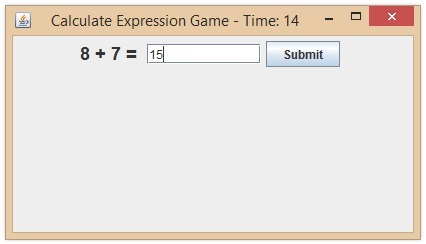
此程式使用 Java Swing 元素構建了一個簡單的遊戲視窗。它建立任意數學公式(+、- 和 *),並提示使用者在設定的時間內(在本例中為 60 秒)提供正確答案。
使用者可以提交他們的答案,遊戲將記錄算術問題的數量、正確答案的數量和準確率。在分配的時間結束後,遊戲將顯示結果。
要測試此程式碼的功能,請在 Eclipse 或 IntelliJ IDEA 等 Java 開發環境中執行它。

77 次檢視
