
 資料結構
資料結構 網路
網路 關係資料庫管理系統
 作業系統
作業系統 Java
Java Microsoft Excel
 iOS
iOS HTML
HTML CSS
CSS Android
 Python
 C 程式設計
 C++
C++ C#
C# MongoDB
 MySQL
MySQL JavaScript
 PHP
PHP 物理
物理 化學
化學 生物
生物 數學
數學 英語
英語 經濟學
經濟學 心理學
心理學 社會研究
社會研究 時尚研究
時尚研究 法律研究
法律研究以 Java Swing 建立半透明視窗
使用 JDK 7,我們可以非常輕鬆地使用 Swing 建立一個半透明視窗。透過以下程式碼,可以使一個 JFrame 變為半透明。
// Set the window to 55% opaque (45% translucent).
frame.setOpacity(0.55f);
示例
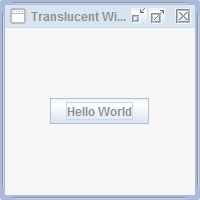
請看下面這個半透明度為 55% 的視窗示例。
import java.awt.GridBagLayout;
import javax.swing.JButton;
import javax.swing.JFrame;
import javax.swing.SwingUtilities;

public class Tester {
   public static void main(String[] args)  {
      JFrame.setDefaultLookAndFeelDecorated(true);
         // Create the GUI on the event-dispatching thread
         SwingUtilities.invokeLater(new Runnable() {
         @Override
         public void run() {
            createWindow();
         }
      });
   }

   private static void createWindow() {
      JFrame frame = new JFrame("Translucent Window");
      frame.setDefaultCloseOperation(JFrame.EXIT_ON_CLOSE);

      frame.setLayout(new GridBagLayout());
      frame.setSize(200, 200);
      frame.setLocationRelativeTo(null);

      //Add a sample button.
      frame.add(new JButton("Hello World"));

      // Set the window to 55% opaque (45% translucent).
      frame.setOpacity(0.55f);
      frame.setVisible(true);
   }
}
輸出

更新日期: 2020-6-19
300 閱讀量

廣告